Publish a VS Code extension to the Marketplace and Open VSX from one pipeline
A GitHub Actions workflow that builds one VSIX and publishes it to the Marketplace and Open VSX, with re-runs, pre-releases, targets and checks.

Builds VSXRank · 11 min read
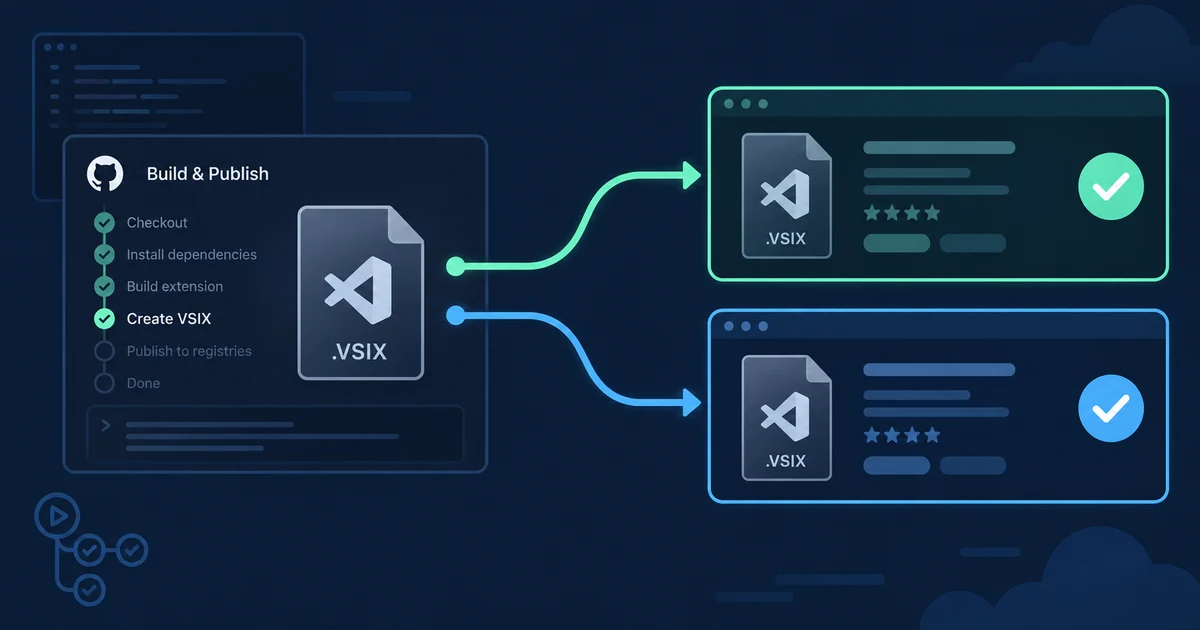
To publish a VS Code extension to both the Marketplace and Open VSX, build the VSIX once and upload that same file with vsce and ovsx in separate jobs. Separate jobs let you re-run only the registry that failed, and --skip-duplicate makes a re-run safe. It matters in practice: on 22 September 2026, 15.6% of the 14,065 extensions VSXRank finds on both registries under the same ID showed a different latest version on each one. This guide gives a GitHub Actions workflow we linted and checked against the current CLI source, plus the recovery steps for a release that only half succeeded.
Publish a VS Code extension to the Marketplace and Open VSX in one workflow#
This guide assumes both accounts already exist: a Marketplace publisher and an Open VSX namespace with a signed Publisher Agreement. If you haven't set up Open VSX yet, start with our Open VSX publishing guide. Then add two repository or environment secrets, VSCE_PAT and OVSX_PAT.
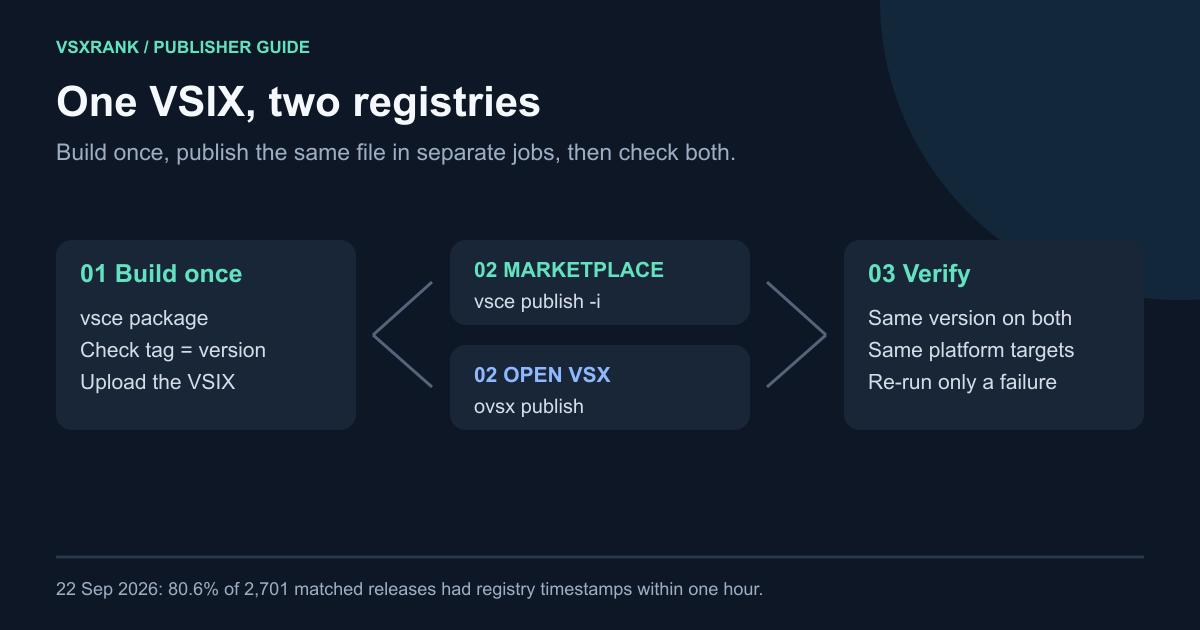
Save this as .github/workflows/release.yml. It runs when you push a tag such as v1.4.0:
name: Release

on:
  push:
    tags: ['v*']

permissions:
  contents: read

jobs:
  package:
    runs-on: ubuntu-latest
    outputs:
      ext-id: ${{ steps.meta.outputs.ext-id }}
      version: ${{ steps.meta.outputs.version }}
    steps:
      - uses: actions/checkout@v7
      - uses: actions/setup-node@v7
        with:
          node-version: 22
          package-manager-cache: false
      - run: npm ci
      - id: meta
        name: Check the tag matches package.json
        run: |
          VERSION=$(node -p "require('./package.json').version")
          EXT_ID=$(node -p "const p=require('./package.json'); p.publisher + '.' + p.name")
          test "v$VERSION" = "$GITHUB_REF_NAME"
          echo "version=$VERSION" >> "$GITHUB_OUTPUT"
          echo "ext-id=$EXT_ID" >> "$GITHUB_OUTPUT"
      - run: npx --yes @vscode/[email protected] package --out extension.vsix
      - uses: actions/upload-artifact@v7
        with:
          name: vsix
          path: extension.vsix
          if-no-files-found: error

  marketplace:
    needs: package
    runs-on: ubuntu-latest
    environment: release
    steps:
      - uses: actions/download-artifact@v8
        with:
          name: vsix
      - uses: actions/setup-node@v7
        with:
          node-version: 22
          package-manager-cache: false
      - run: npx --yes @vscode/[email protected] publish --packagePath extension.vsix --skip-duplicate
        env:
          VSCE_PAT: ${{ secrets.VSCE_PAT }}

  open-vsx:
    needs: package
    runs-on: ubuntu-latest
    environment: release
    steps:
      - uses: actions/download-artifact@v8
        with:
          name: vsix
      - uses: actions/setup-node@v7
        with:
          node-version: 22
          package-manager-cache: false
      - run: npx --yes [email protected] publish extension.vsix --skip-duplicate
        env:
          OVSX_PAT: ${{ secrets.OVSX_PAT }}

  verify:
    needs: [package, marketplace, open-vsx]
    runs-on: ubuntu-latest
    steps:
      - uses: actions/setup-node@v7
        with:
          node-version: 22
          package-manager-cache: false
      - name: Both registries list this version
        env:
          EXT_ID: ${{ needs.package.outputs.ext-id }}
          VERSION: ${{ needs.package.outputs.version }}
        run: |
          for attempt in $(seq 1 10); do
            mkt=no; ovsx=no
            npx --yes @vscode/[email protected] show "$EXT_ID" --json \
              | jq -e --arg v "$VERSION" 'any(.versions[]; .version == $v)' >/dev/null && mkt=yes
            curl -fsS "https://open-vsx.org/api/${EXT_ID/.//}/$VERSION" \
              | jq -e --arg v "$VERSION" '.version == $v' >/dev/null && ovsx=yes
            echo "attempt $attempt: marketplace=$mkt open-vsx=$ovsx"
            if [ "$mkt" = yes ] && [ "$ovsx" = yes ]; then exit 0; fi
            sleep 30
          done
          exit 1
What "tested" means here: the workflow passes actionlint. We ran the packaging commands and both CLIs' offline validation on a sample extension, and ran the verification loop against a live listing. We did not publish a real release from this exact file, so validate it in a test repository and publisher namespace before using it for a production release.
Why each piece is there#
- One build, two uploads.
vsce publish --packagePathpublishes a VSIX you already built instead of repackaging it. The VS Code publishing guide documents the flag, and the vsce CLI source describes-i, --packagePathas "Publish the provided VSIX packages". The ovsx CLI README documentsovsx publish <file>for "an already packaged file". Both registries therefore get the same bytes. - Pinned CLI versions.
@vscode/vsce4.0.0 andovsx1.2.0 were the current npm releases on 22 September 2026, and both packages declare Node 22 or later inengines. Pinning them means a CLI update can't change your release job without a commit. - The tag check. Both registries identify a release by
package.jsonversion, not by your git tag. Failing early when they disagree prevents a tag namedv1.4.0from shipping1.3.9. - Separate jobs and an environment. Keeping the two uploads in separate jobs keeps one registry's failure out of the other's job. The
releaseenvironment lets you scope the secrets and add required reviewers. Caching is left off in the release jobs deliberately, sincesetup-nodenow warns about cache poisoning in privileged workflows. - Current action majors. GitHub removes Node 20 from its runners on 23 September 2026. The action versions above run on Node 24.
What the registries show on 22 September 2026#
VSXRank reads both catalogs and their version histories every day. For extensions with an identical publisher.name on both registries, the crawl finished at about 01:12 UTC on 22 September 2026:
| Dual-listed extensions (same ID on both) | Count | Share |
|---|---|---|
| Listed on both registries | 14,065 | 100% |
| Same latest version on each | 11,867 | 84.4% |
| Open VSX's latest is an older Marketplace version | 1,145 | 8.1% |
| Marketplace's latest is an older Open VSX version | 482 | 3.4% |
| Version histories share neither latest version | 523 | 3.7% |
| Each lists the other's latest (ordering differs) | 47 | 0.3% |
Recent releases show two very different kinds of publisher. We took the last stable Marketplace release from each of the 2,701 dual-listed extensions that shipped one between 23 August and 21 September 2026:
| Last stable Marketplace release, 23 Aug–21 Sep 2026 | Extensions | Share |
|---|---|---|
| Same version on Open VSX by 22 September | 2,423 | 89.7% |
| Registry timestamps within one hour of each other | 2,176 | 80.6% |
| Registry timestamps within 24 hours | 2,331 | 86.3% |
| Reached Open VSX more than a day later | 55 | 2.0% |
| Not on Open VSX as of 22 September | 278 | 10.3% |
When both uploads happen, they usually happen together. Each registry records its own timestamp, and we don't know which processing step either one marks. In 98 cases, Open VSX's timestamp came more than an hour before the Marketplace's. In this snapshot, most matching version timestamps are close together; this cross-sectional view cannot estimate how likely an unmatched version is to arrive later. Of the 1,067 extensions whose Open VSX listing trails a stable Marketplace release, 560 have been behind for more than a year and only 53 fell behind in the last seven days. The median gap is 401 days, typically two stable versions. That pattern looks like a second upload that stopped running, not a queue.
One live example is Kilo Code. Open VSX timestamped its 7.7.7 release at 06:42 UTC on 22 September. The Marketplace's per-platform records for the same version are timestamped about 06:53 UTC, and both registries list eight platform builds.
The Marketplace-only side is larger. Of 9,064 Marketplace extensions that shipped a stable release in the same 30 days, 6,363 had no Open VSX listing under the same ID. That includes 537 with at least 1,000 installs and 54 with at least 100,000. About half of those 54 come from Microsoft publishers, whose extensions largely stay Marketplace-only. Matching by exact ID misses extensions that were republished under a different namespace. For the wider overlap, see the September catalog report.
Tokens: PATs today, Entra ID and trusted publishing next#
Marketplace. vsce reads VSCE_PAT when -p is not given. The official guide says the Azure DevOps token needs the Marketplace (Manage) scope and All accessible organizations. The same page also warns: "On December 1, 2026, global Personal Access Tokens (PATs) in Azure DevOps are retired." A PAT-based workflow built today has about ten weeks left. Microsoft's documented replacement is Microsoft Entra ID: a user-assigned managed identity with a federated credential, added to your publisher as a member, then vsce publish --azure-credential. The guide's walkthrough uses Azure Pipelines.
On GitHub Actions, two routes exist that the guide doesn't cover:
--azure-credentialafter an Azure login. In vsce 4.0.0,--azure-credentialtries a credential chain that includes the Azure CLI credential. Anazure/loginstep using OIDC should therefore satisfy it. This is our reading of the source; Microsoft doesn't document it.vsce publish --oidc. The vsce README documents Marketplace trusted publishing for the repository and workflow. It needspermissions: id-token: writeand never falls back to a PAT. The flag is hidden from--helpin 4.0.0, and the VS Code guide doesn't yet describe setting up the Marketplace side. Confirm your publisher page offers a trusted publishing policy before you depend on it.
Open VSX. ovsx reads OVSX_PAT, and a --pat or OVSX_PAT always takes precedence over trusted publishing. The CLI README documents ovsx publish --trusted-publishing: a namespace owner registers the repository and workflow under trusted publishers, and the job needs id-token: write. The registry's trusted publishing page adds limits: the first version must be published with a token, each extension gets one trusted publisher, and the setting is off by default on a registry instance. Keep OVSX_PAT until your namespace settings show the option.
Pre-releases and platform-specific builds#
The pre-release mark lives inside the VSIX, so it's set when you package. Build with vsce package --pre-release --out extension.vsix, then publish with vsce publish --packagePath extension.vsix --pre-release. vsce 4.0.0 refuses --pre-release for a package that wasn't built as a pre-release, which is a useful guard. ovsx ignores --pre-release for a prepackaged file and prints a warning: it takes the mark from the manifest. The Marketplace supports only major.minor.patch versions, not semver pre-release tags, and recommends even minor numbers for releases and odd ones for pre-releases.
For native code, package once per target. The documented targets are win32-x64, win32-arm64, linux-x64, linux-arm64, linux-armhf, alpine-x64, alpine-arm64, darwin-x64, darwin-arm64 and web:
  package:
    strategy:
      matrix:
        target: [win32-x64, linux-x64, darwin-arm64]
    runs-on: ubuntu-latest
    steps:
      # checkout, setup-node and npm ci as above
      - run: npx --yes @vscode/[email protected] package --target ${{ matrix.target }} --out extension-${{ matrix.target }}.vsix
      - uses: actions/upload-artifact@v7
        with:
          name: vsix-${{ matrix.target }}
          path: extension-${{ matrix.target }}.vsix
          if-no-files-found: error
In each publish job, download with pattern: vsix-* and merge-multiple: true. Then pass every file to vsce publish --packagePath extension-*.vsix --skip-duplicate and to ovsx publish --packagePath extension-*.vsix --skip-duplicate. Both flags accept several paths. Each CLI reads the target platform from the package, and vsce rejects --target combined with --packagePath. If a native dependency must be compiled on the target OS, run that matrix entry on a matching runner instead of ubuntu-latest.
The two CLIs behave differently with several files. vsce 4.0.0 publishes them one at a time and stops at the first error. ovsx 1.2.0 uploads them in parallel, reports every failure and exits non-zero. After a failure, some targets may be live on either registry, which is one more reason to keep --skip-duplicate.
When one registry succeeds and the other fails#
A release that half succeeded is the normal failure. The Marketplace might reject a package that Open VSX accepted, or an Open VSX namespace permission might have lapsed. Recover in this order:
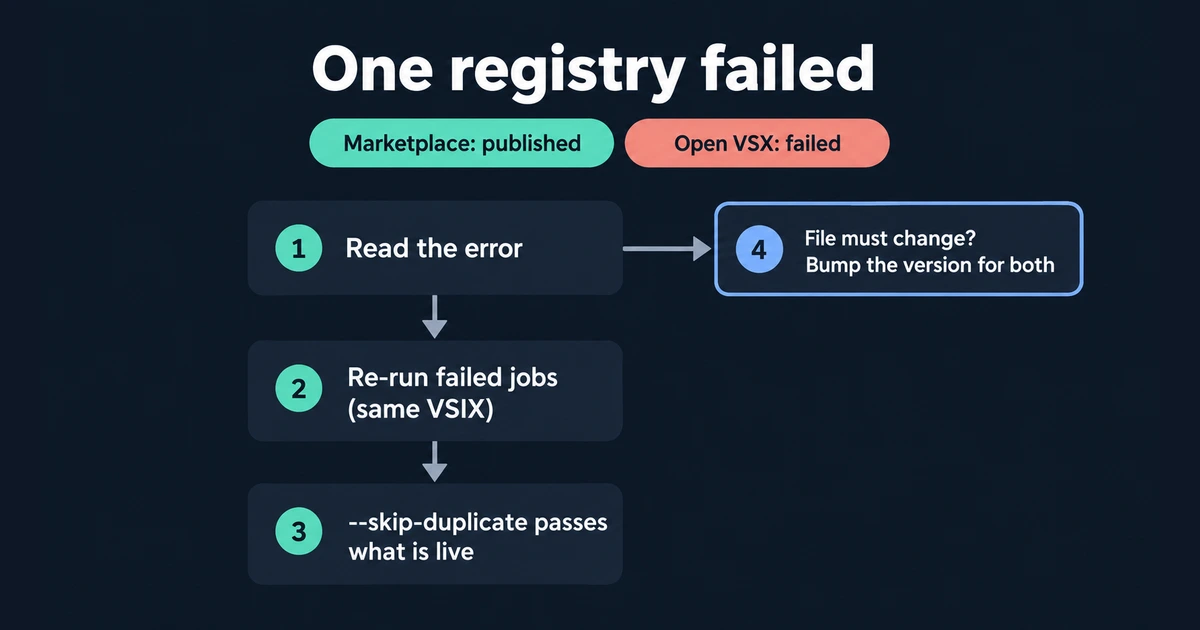
- Read the failed job's error. Fix the token, namespace or package problem it names. If the fix needs a new package, jump to step 4.
- Re-run failed jobs. GitHub re-runs use the original commit SHA and ref and are allowed for 30 days. The re-run downloads the same
vsixartifact, so the second registry gets the file the first one accepted. - Let
--skip-duplicateabsorb repeats. vsce checks whether the version already exists for that target and logs "is already published. Skipping publish". ovsx does the same when the registry answers that the version "is already published". Without the flag, both CLIs fail on a version that's already live. - Bump when the file itself must change. Neither registry lets you replace a published version in place. The VS Code guide adds that an unpublished Marketplace version number "can't" be reused. If the package has to change, publish the next patch version to both registries rather than giving them different files under one version number.
--skip-duplicate has one cost: a forgotten version bump looks like success. The tag check catches a mismatch between the tag and manifest, but it cannot detect reuse of an already-published matching version. Confirm that the version is new for a new release; skipping duplicates does not compare artifact bytes.
Verify both listings after the release#
The verify job polls both public sources for up to five minutes. vsce show <id> --json returns every Marketplace version with its targetPlatform. https://open-vsx.org/api/<namespace>/<name>/<version> returns 200 with the version's metadata, or 404 if it doesn't exist. For a platform-specific release, compare the target lists too: the Open VSX response has a downloads object keyed by platform. Then open both listing pages and check the README images, icon, changelog and repository link. A successful upload only proves that the registry accepted the file.
Once the release is out, don't combine the two counters. Marketplace figures are installs, while Open VSX counts downloads, including each update. Here's why Open VSX downloads look inflated.
Should you use HaaLeo/publish-vscode-extension instead?#
HaaLeo/publish-vscode-extension is the action the Open VSX wiki points to, and it's a reasonable choice. It wraps both CLIs behind one step. Its vsixPath output lets you publish to Open VSX and then pass the same file to a Marketplace step. It also exposes preRelease, skipDuplicate, target, dependencies and dryRun inputs. The trade-offs are visible in its repository on 22 September 2026:
| HaaLeo action v2 | Direct CLI (this guide) | |
|---|---|---|
| Setup | One uses: step per registry | A run: line per registry |
| CLI versions | Bundled: vsce ^3.2.2, ovsx ^0.10.1 | You pin: vsce 4.0.0, ovsx 1.2.0 |
| Authentication | pat input is required | PAT, --azure-credential, OIDC flags |
| Latest release | v2.0.0, 23 February 2025 | npm releases in September 2026 |
| Action runtime | node20 in action.yml | Your chosen Node 22 |
The action has no input for --azure-credential, --oidc or ovsx trusted publishing, and its required pat input has no path past the December 2026 PAT retirement. GitHub now runs Node 20 actions on Node 24, so the runtime line matters less than the auth line. If you only publish with tokens this year, the action saves a few lines. If you need Entra ID or trusted publishing, call the CLIs directly.
Once both listings are live, VSXRank shows the Marketplace installs and Open VSX downloads side by side on one extension page, along with every release date. Open the live demo to see that view on a real extension before you add your own.